Google Technology|iPhone|Android|Reviews|Windows }

Disk Image Software-Creating and Extracting ISO Files ,Cue files,NRG files etc 1

KobraHunter | Friday, August 10, 2012 | , ,

Many users are eager to know what is a bin file and how to open bin file,what is a cue file?,how to mount iso image, how to create windows xp or windows 7 iso image?. Some game and software uploaders create iso image, bin file or cue file to convert multiple files into a single file.A lot of Disk Image Softwares like Windows disk image burner, active disk image and Daemon tools are available.
In this article i am explaining how to deal with these files.

Iso files and Bin files are commonly used Formats to Create Disk Image File.  ISO in ISO Image stands for International Organization for Standardization. Bin is commonly, a binary file. Software and game downloaders may also come across a file with extension .cue. Cue file is actually a meta file which contains data related to layout of tracks in CD or DVD.

All Disk Image Files contain all written sectors of an Optical device or any other Storage Devices. From this single Image Disk we can easily extract contents by using a Disk Image Mounter. Disk Image Mounters are used for Extracting ISO Files  or Extracting BIN files by Mounting Disk Image on to them. Disk Image Softwares can create any number of Virtual Drives which can work similar to physical drives.

Windows also provide a Disk Image Software called Windows Disk Image Burner by using which you can burn .img and .iso Image Files.

Active disk image  is a similar software popularly used.

List of Free Mounting Softwares for Image Files like ISO Image and Bin File.
These Free Disk Image Software helps to Create,Edit,Mount and Burn Image Files.
Capabilities of each Disk Image Software is shown in brackets.


1.Daemon Tools Lite(Mount)
extracting bin


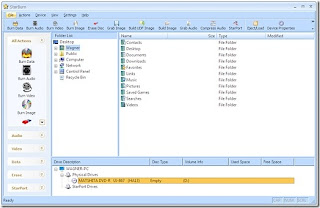
2.StarBurn (Burn)
extracting cue


3.AVS Disc Creator (Create, Edit, and Burn)
extracting files from iso


4.VirtualCloneDrive (Mount)
iso image mount


5. WinCDEmu (Mount)
how to open bin file


6.Pismo File Mount (Mount)
create iso image


7.MagicDisc (Create and Mount)
mount iso image


8.ImgBurn (Burn)

bin file extractor

9.ImageMaster (Create, Read, Extract, and Burn)
iso image creator


10.InfraRecorder (Burn)
what is a bin file


I commonly use Daemon tool(short for Disk And Execution MONitor tools). Now we can move on to Extracting Iso Files and Extracting Bin Files. Daemon tools for Linux and Windows are available.

Daemon tools Functionality

Daemon tools can Mount *.mdx, *.mds/*.mdf, *.iso, *.b5t, *.b6t, *.bwt, *.ccd, *.cdi, *.bin/*.cue, *.ape/*.cue, *.flac/*.cue, *.nrg, *.isz disc images to a virtual drive

Convert images from all above formats to *.mdf/*.mds, *.mdx, *.iso

Make .iso, *.mds/*.mdf and *.mdx images of CD, DVD, Blu-ray discs

Make a compressed disc image or split the image to several files

Protect images with password

Step 1.

Open Daemon tools
make iso image

Step 2.

Click on ADD FILE button. A new window pop up.
iso image reader


Step 3

Select Image File For Extraction and click ok.
iso image software

Step 4

That Image file will be added to Daemon tools
windows 7 iso image free download

Step5

Click on Mount Button
cue file format

Step6

Wait until mounting process completes
create iso image from cd

Step7

Symbol on the drive changes
windows 7 burn iso image

Step8

To view Extracted files, Right click on the drive and select Open in file explorer.
mount iso image linux

Step9

Folder and files open up
ubuntu iso image

Step10

To unmount,Right click on drive and Click UNMOUNT

ubuntu iso image

Android 4.1, Jelly Bean: 16 changes from ICS 0

KobraHunter | Tuesday, July 17, 2012 | , , , ,


If you have ICS in your smartphone or android devices, then you can see sweet changes in latest Jelly Bean. If you are using old android versions, then jelly Bean will show you some big changes. Actually Android 4.1 or Jelly Bean is a polished, sweeter and performance enhanced version with mix of new features too.
Some important changes are listed below......


1. Notification pulldown has a novel look with large font size.

2.There are many new effects and transitions distributed throughout.
    a.When you move finger to unlock, circle of small dots follow your finger.
    b. Opening an app from home will also show some zooming effect.

3.New "Share" menu system with "open with" dialog box.


4.Initial phone setup task is more simpler than previous version.

5.Jelly Bean is Faster than ICS
    Why faster?
        Speed is increased by altering system frame-rate and display refresh signal.
        Also by implementing a new touch input system that anticipates where you will touch and it will give an extra power to CPU when you actually touches screen.

6. A new search system which will give you Informational cards instead of web results.


7.The voice search system is really good one. It will show you results in the form of cards.


8. From notification pulldown screen, you can expand notifications and get additional information and options related to that notification.


9. It is easier to arrange and add widgets and shortcuts in homescreen.

10. A new Sound Search widget which can tell you name of song and artist after listening to song for a few seconds.


11. An updated Camera app which will allow you to swipe to jump into gallery directly.

12. System keyboard is now updated with good dictionaries, intelligent word predictor and text to speech functionality.

13.NFC sharing of photos,videos etc

14.Now you can update essential parts of an app instead of installing the complete one with"Smart app update".

15.Updated and improved Face unlock security.

16.Gesture based navigation commands for visually impaired android users.


What is 4FF and 3FF in SIM? 0

KobraHunter | Saturday, June 02, 2012 | ,

3FF is also called Microsim. It is most commonly used in mobile devices. The microsim was introduced in 2003. This form is called Third Form factor or 3FF.

Various SIM cards are,

First Form – Credit Card Sized cards
Second Form – Stamp Sized SIM cards
Third Form – microSIM


Now ETSI accepted new standard named nano sim which is also called 4FF or forth Form Factor. 3FF has a dimension of 12mm x 15mm.
Various Sim sizes and dimensions are showed in the image shown above.

Mobile Phone makers for a new,smaller SIM card Standard 0

KobraHunter | Saturday, June 02, 2012 | , , , ,

Cell phone manufacturers decided to adopt a new standard for smaller SIM cards. Nokia Oyj and Apple presented competing proposals. Apple's proposal was selected for the novel SIM standard. The new standard was selected by ETSI(European Telecommunications Standards Institute). 


This standard is compatible with the existing SIM card design too. The new SIM size will be 40% smaller than existing version. 

Alert:Internet may shutdown on July 9 0

KobraHunter | Saturday, June 02, 2012 | , , , ,


While searching using Google, if you get a message like "Your computer appears to be infected", dont get frightened. Google has issued this warning to millions of users which also says that they could lose internet connectivity after july 9. This is due to a computer virus or a malware named DNSChanger. Google displays the warning message to help users whose systems are infected with the above malware. Most people are unaware about the situation. So before clicking on links make sure it is secure. Do not try to open suspicious web pages.

How DNSChanger works?


DNSChanger is a Trojan horse which is assumed to be infected about 4 million Computers globally. Out of this 500,000 is in USA and 20,000 is in India. This malware will change the DNS server settings to some rogue DNS network created by malware developers.
The concept behind this malware is to interfere IP address lookup and give a false IP address to computer. The result is that, when you try to open your favorite website, it will be redirected to some fake webpage.

This is really a threat to internet users. So be carefull and if you are infected, do necessary steps to change or restore DNS setting. I will explain step by step procedure in my next post.

How Live CD/DVD differs from OS? 0

KobraHunter | Thursday, May 17, 2012 | , , ,

Screenshot of the Live CD of Mandriva Linux Free 2010.2 RUS with KDE 4


Live CD/DVD is a complete operating system which can run in computers memory instead of loading from hard drive. There are many Live CD/DVD available in internet like Black track, Hirens boot cd etc. An interesting feature of this Live CD/DVD is that, users can evaluate and analyse OS without installing it. These are really a boon if computer is running out of storage space. Users can use OS without making changes in present Operating system.


Commonly, the Live CD/DVD do not change hard drive files. But in certain situations it is necessary to change hard drive files for removing virus or malwares and for system restore. So special applications and mechanisms are used here.


Its uses include,
    * quick and simple clustering of computers
    * installing a Linux distribution to a hard drive
    * testing new versions of software
    * cracking/stealing passwords
    * network security testing
    * listing & testing hardware
    * system repair and restoration
    * high security/non-invasive environment for a guest
    * computer forensics
    * playing video games
    * providing a secure server platform where crucial files cannot be permanently altered
    * providing a secure, reliable platform for the performance of high-vulnerability tasks such as internet banking;
    * Internet kiosks, which can be brought back to their original state by a reboot

How to Delete or remove DigiNotar CA certificate? 1

KobraHunter | Tuesday, August 30, 2011 | , , ,


Dutch certificate authority Diginotar issued a certificate which caused problems to Gmail users. Here you can find steps to remove or delete DigiNotar CA certificate and avoid attack in Mozilla firefox.


1.    In the Tools menu click on Options.

2.    From that select Advanced

3.    Then select Encryption.

4.    Now you can see Certificate Tab and click on that.

5.    In the certificate manager box click on Authorities tab
6.    Scroll down and stop when you reach DigiNotar.

7.    On that select DigiNotar Root CA

8.    Click on Distrust or Delete button.

9.    Finally click on OK

Stay safe

Difference between Wi-Fi and WiMAX 0

KobraHunter | Saturday, August 27, 2011 | , , , ,


Usual ways of Internet access are Dial up, broad band and Wi-Fi. Dial up access may be used for very low speed and data access. They are nowadays not commonly used. Broadband access is commonly used and it is comparatively faster than dial-up. Here the connection is through wires. In Wi-Fi the connection is wireless. Wi-Fi can be used using wifi router or using wifi hotspots.

There are some problems with these internet access technologies. Dial up is very slow and broadband is based on wires.Also, broadband is costly and unreachable in many places.  In wifi the range is very small and it makes limited internet access. So we go for a new technology in internet access  which solves the above problems. That technology is termed as WiMAX.


WiMAX provide high speed internet access without wires and modems. Instead of small wifi coverage, WiMAX provides broad coverage like a mobile phone network. WiMAX is short form of worldwide interoperability for Microwave access. WiMAX could definitely replace cable and DSL services. It will provide internet connection everywhere. When you switch on your Laptops, it will connect to the nearest WiMAX antenna.
WiMAX is similar to Wi-Fi, but the former has high speed, better coverage and can provide service to many people. Wi-Fi access is limited to about 30 m while the WiMAX coverage extends upto 50 km. Wi-Fi have a maximum speed of about 54 megabits per sec. But WiMAX can provide about 70 Megabits per sec.


Recent searches

free wifi hotspots, 3g wifi router, wifi access point, wireless network, wimax technology, wifi hotspots, wifi dongle, wifi router, what is wifi, what is wimax, wifi internet

Images of HTC Bliss Leaked 0

KobraHunter | Friday, August 26, 2011 | , , ,


XDA.cn got some images of the Android based HTC bliss and also the pictures of the Sense 3.5 UI. After May, we have only blurry pictures of bliss and now we have clear crisp pictures which are added below. It is said that the HTC Bliss is mainly for women and it will be launched by the end of the September.


It is expected to have deep facebook integration and apps for beauty, shopping and similar tasks.  The new HTC product comes with 3.7 inch display, an 800Mhz processor and a front camera. It will be based on Android 2.3 Gingerbread.

Convert Any File into Another Format Online:Go2convert 0

KobraHunter | Friday, August 26, 2011 | , , ,

Go2convert is a handy site to convert any file of any format to compatible format without much delay. The site supports various image formats and also other formats. If you got a file and you have no way to open it and use it, you can simply upload the file to this online converter and get compatible output file. Uploading is easy in this site and it support standard uploader too.


More than 100 different formats can be uploaded and get converted. After uploading the unknown file, the site outputs a list of compatible formats. You can select one from this list and finish the process.


Related searches

mp4 to mp3 converter free download
how to convert files to mp3 format
all format to all format converter
gps coordinates format conversion
free online file format converter
video format conversion software
video format conversion freeware
audio format conversion software